Working with YouTube

This week I’ve been having a long look at my YouTube page. I have quite a lot of videos over there and a few relate to this actual WordPress site which you are currently looking at. Some are promotional videos like the one you will find right at the bottom of this post which try to persuade the viewer of the merits of either Floating in Space or my poetry book, A Warrior of Words.

Back in the 1990s I felt it was about time that I did something about becoming a film director so I went on a video production course at a now defunct place in Manchester called the WFA. The Workers’ Film Association was situated in Hulme near the city centre and had what was at the time quite a hi-tech video editing set up. Sadly, a few years later, the digital revolution came and all the training I had done with video tapes and super VHS cameras was rendered not worthless but seriously behind the times.

The video I made back then was about the taxi drivers of Manchester and it was one of the first videos I was able to digitise and upload to YouTube. Manchester Taxi 1992 is my 5th most popular video with over 4,200 views. The four more popular videos are all, with one exception, old VHS videos that have also been digitised. The one exception is a promo video for Floating. It has six thousand views which I have to put down to using it in a Google advertising campaign some time ago.

My big issue with YouTube is that despite having a small handful of videos with pretty substantial views -my top video has over 180,000 views- I don’t make a penny in royalties because in order to make money on YouTube, you must have over a thousand followers. I have at the moment about 402 YouTube followers and it’s been difficult to even break that 400 figure. For a long time I had 398 followers but every time I found a new follower, I would lose one. I would get to 399 and be on the verge of cracking the 400 barrier, only to drop back again to 398 or even 397. Just lately I seem to be remaining steady at 402.

Why am I losing followers? Well even though I manage to produce a new blog post every Saturday, I don’t produce a new video every week. In fact I don’t even produce a new video every month. Why not you might ask? Well, for a kick off, videos are pretty hard to make. They have to be filmed and then edited. They need a lot of time and effort and I seem to spend all my time and effort writing my weekly blog post. Sometimes in the past when I’ve struggled to make a video I’ve tried to take an old blog post and make it into a video. I’ve done quite a few versions of my book bag posts as videos but some work out well and others don’t. I remember making one and feeling quite pleased with myself but then reviewed the video and found myself talking about my Book Blag and also about Bleak House by David Copperfield!

A lot of my regular videos are video versions of my poems and I began to wonder whether those people who come to my site to watch my old VHS videos of motor racing at Oulton Park or Manchester Airport in the 1980s are perhaps a little put off to encounter my poetry videos.

Not that my poetry is in any way offensive, in fact I personally think it is rather good or at least I like to think it has a certain charm. Then of course as they are my videos and I made them, I’m bound to say that. The thing is, those people who come to my page to listen to poetry might not necessarily like my other videos and those that like the other things might be thinking ‘what’s all this poetry stuff doing here?’

That is basically why I thought it might be a good idea to create a separate YouTube page dedicated to my poetry videos. After a quick bit of research, I found that I could create another page quite easily so with a few taps on my keyboard there it was! The next thing was to migrate my poetry videos over to the new page and this is where the problems began. I thought I might be able to do it with just a few more keyboard clicks but migrating videos sadly isn’t possible which is rather annoying. The only answer is to delete the videos from my main YouTube page and then upload them again to the new page.

The big problem with this is that firstly, doing all that takes a lot of time and secondly, it means that I’ll lose all the viewing figures from those original videos. Now a lot of my video poems don’t have great viewing figures or ‘likes’ but surprisingly quite a few of them have really good stats and it’s a bit of a shame to see them all go back to zero on the new page.

The other thing is finding the original videos. I don’t delete them and I still have them on my hard drive but in many cases I tend to edit them again and add perhaps different music, some subtle sound effects and sometimes even a new voiceover. I haven’t named the video files particularly well so it isn’t always easy to find which is the newest or even the best version. Not only that but as my trusty old laptop gets clogged up with loads of videos and has started running really slowly I’ve shifted them over to portable hard drives to free up space so they are not as accessible as before.

Message to YouTube if they happen to see this post. Give users the options to easily move videos to different channels. Things could be so much easier!

Anyway, I’ve started things off, added an introductory video and over the next few months I should eventually have all my poetry videos moved over to the new page. Of course perhaps I should announce the new set up to my small band of followers. How could I do that? Well, I’ve noticed that YouTube has made it possible for channels to create a post, much like Facebook and Twitter. So, I could make a post announcing the new channel and the changes I’ve made. I did a quick search on Google asking ‘how do I create a post on YouTube?’ The answer came straight away and looked pretty straight forward. Could I manage to create a post though? Of course not.

Perhaps that’s something that can’t be done on an iPad so I switched over to my laptop and guess what? I actually managed to finally create my first YouTube post. Happy days!

My usual YouTube page can be found here:

https://www.youtube.com/@SteveHigginsWriterBloggerPoet

My new poetry page can be found here:

https://www.youtube.com/@PoetrybySteveHiggins


What to do next: Here are a few options.

Share this post on your favourite social media!

Hit the Subscribe button. Never miss another post!

Listen to my podcast Click here.

Buy the book! Click here to purchase my new poetry anthology.

Click here to visit Amazon and download Floating in Space to your Kindle or order the paperback version.

Making the YouTube Video

One of my friends asked me about my videos the other day. He wanted to know if they were easy to make and how much I planned them in advance. Anyone who knows me will know that I don’t plan anything in advance but I thought it might be interesting to show readers just how I put together a video.

The Idea/Shooting

I did a video a while ago as part of a beta testing programme I was asked to take part in. The testing was for a new update over on Animoto.com which is an online video editing site. The new addition was the facility to add a voice recording to a video which I had actually advocated quite a few times on their Facebook forum page. The video I decided to make stemmed from a blog post about writing poetry and it was called Idea, Inspiration and Effort. Those three things were what I thought was required to produce a poem and to be fair they could be applied to anything, a poem, an essay, a blog post, a novel or indeed, a video.

Everything of course starts with an idea. What shall I write about or what can I make a video about? For me I tend to shoot all sorts of video and then only later start to think about how I can put it together and use it in a finished product. For the video mentioned above over on Animoto I chose a template from their fairly wide range and then it was just a matter of adding in the stock photos or video and then the graphics. Animoto provides stock photos which I do use regularly but if possible, I always try to use photos I have taken myself. For instance, I needed a sunset shot for this video and I knew that I had a shot of a sunset taken in Greece on the island of Kalymnos so I uploaded that.

Of course, for a video like that, not much actual filming was required but normally, filming is the first step in any video. One way to prepare for a shoot is to make story boards. They are used extensively in the cinema and I’ve seen documentaries showing wonderful story boards from films like Citizen Kane to Aliens. They are simply drawings that look like comic strips showing the visual look of each different scene. Good for films using actors but not much use for documentaries or short films, well at least, not in my opinion. I tend to film first and then plan later how to use my recorded video. Others might think story boards a great help.

Reviewing the footage.

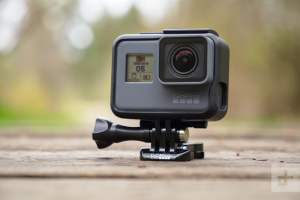
A short video like the one above is pretty easy but for my most recent video, a compilation of GoPro video shot mostly through the windscreen of my motorhome, well that was a little harder. I had a rough idea what I wanted so the next step was just to review all my footage. That involved hours and hours of going through a lot of video, a great deal of which was not very inspiring. Many times, I had left my GoPro running when I should have shut it down. Other times I pressed record at some wonderful area of French countryside, only to find that the resulting video wasn’t so wonderful.

A GoPro Hero similar to mine.

The Rough Cut

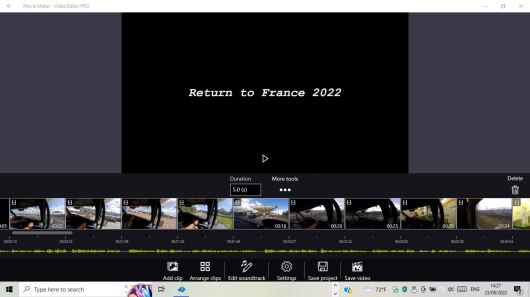
After reviewing everything, I dropped all the better shots into my video editor and the result was a video lasting well over an hour. My big mistake on a lot of our French trips is not shooting much additional video.  I may have recorded us arriving at a spectacular lake but then I hadn’t taken the camera and shot around the lake. We’d take a trek around a lovely French village and again I didn’t shoot anything in the village. However, having visited France so many times I went back over all my older video looking for interesting things.

In 2020 we parked by the river Seine one day and I had filmed the ferry going across to the other side and a huge ship chugging serenely past. I had not used that footage in previous videos so I added that into the editor. On a number of occasions, I’ve tried to shoot things that motorhomers have to deal with as routine, things like emptying the toilet and the waste water and topping up the drinking water and so on, so I added a number of clips showing all those processes.

In Rouen a few years ago we were following the directions from the Google lady on Google maps when we found ourselves heading into a tunnel which I realised we weren’t going to fit under. Luckily there was an escape road and we were able to exit but when we passed the area again this year, I recorded us travelling past and so I was able to talk about the experience.

The Final Cut

Less is more has always been my video adage so I trimmed out more and more video until I was left with some short story blocks or chapters: Travelling through the channel tunnel, heading on south through France with a quick look at where we stopped in 2020 by the Seine. Going through Rouen and avoiding the low tunnel. Various camping sites. Maintaining the motorhome and emptying the waste. A final stop and a barbecue and then returning to home via the ferry.

Voice Over

The next step was to put together the narration. Sometimes I write a narration and then tweak the video to fit the text. On this occasion I decided to do something I’d done before which was to jot down a few notes and then just narrate the voice-over as I watched the video. I actually did it quite a few times. The first and second versions had a lot of ums and ahs but by the third time I finally felt I had something reasonable. My voice-over was more confident than the first two tries and by then I pretty much knew what to say without my notes.

Sound Effects

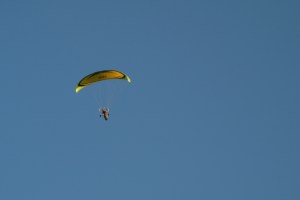
Next I add the sound effects. Now you might think there wouldn’t be much need for sound effects on a video like this, however there were a couple. On a sequence where I showed the outdoor laundrettes which abound outside supermarkets in France, I had combined some still shots with video so I added some washing machine sounds to cover that and on another sequence, I had slowed down a wobbly shot of a microlight flying overhead. The soundtrack was distorted at the slow speed so I added the sound of a light aircraft which was similar to the sound of the microlight.

Microlight

Where do I get the sound effects? Well Liz bought me one of those sound effect CDs a few years ago but sometimes I head for a site called Zapsplat to download some free sounds.

Just to finish I think it’s important to watch the final product from beginning to end and just look for things that could be tidied up. I added a sequence showing an antique telephone during a bit on the voice-over where I talk about telephones. There were still some superfluous scenes shot through the windscreen which were either boring or too long so I trimmed those down.

Titles and Credits

The final thing is to add the titles and credits. Now being an old-fashioned film maker, I’ve always liked good intros on films. These days in the world of YouTube and TikTok, those long title sequences are not recommended. While I’m trying to get my video started with a few titles and introductions, the viewer has already clicked on to another video so these days the advice is to make those titles and credits short and sweet.

What sort of video editor do I use?

Well I actually like the professional version of the Microsoft Windows Video Editor. It’s pretty simple to use and I always make my rough cut with it. If I want to play with the soundtrack I then take the video over to Power Director where you can do some more complex edits.

Uploading to Social Media

Once you have made a video you want people to see it so it’s only natural to upload to the internet. YouTube is the obvious choice. How do you get people to watch it though? Tricky question and to be fair, I don’t really know the answer. I upload my videos and link them to various other sites. I have quite a few pages on this site here at WordPress where I showcase my videos or use them directly within a post. I also link them to Reddit, Facebook, Twitter and other places that I feel are appropriate. For instance there is a Manchester community on Reddit so I’ll link my Manchester themed videos there. I link my poetry videos to either the Reddit poetry community or to my Writeoutloud poetry page. Over on Facebook there is an amateur video page where video producers showcase their work and chat about it.

One of my big mistakes is uploading to YouTube too early. Once I’ve finished a project, I’ll continue to fiddle with it and start to wish I had uploaded version 7 rather than version 1. A good video site though less popular than YouTube is Vimeo and the good thing about their site is that it’s possible to replace your video with an updated version without losing your stats and comments. Such a pity that feature isn’t possible on YouTube.

Just as I finished this post, I clicked on a video that came up in my YouTube feed. It was about Ridley Scott and the making of Alien. Scott did something special with Alien, he took what could have been a mediocre monster movie and made it into something special. He brought some great designers and a strong cast into the project, made his case to the producers for a bigger budget and ended up with an outstanding film. Preparation and design was the key to that film and preparation and design are important even in small projects like yours, mine and a thousand others you will see on Youtube.

What will your next video project be?


What to do next: Here are a few options.

Share this post on your favourite social media!

Hit the Subscribe button. Never miss another post!

Listen to my podcast Click here.

Buy the book! Click here to purchase my new poetry anthology.

Click here to visit Amazon and download Floating in Space to your Kindle or order the paperback version.